> For the complete documentation index, see [llms.txt](https://docs.dstillery.com/llms.txt). Markdown versions of documentation pages are available by appending `.md` to page URLs; this page is available as [Markdown](https://docs.dstillery.com/using-ds-1/agents/find-prebuilt-audiences.md).
# Find prebuilt audiences
Pull from ready-to-activate audiences when you want something proven, and have it live in minutes.
## What prebuilt audiences are
Prebuilt audiences are Dstillery's off-the-shelf targeting library: **10,000+ audiences** spanning behavioral, demographic, search, and exclusive partner data. There's no build step and no modeling wait: you search the catalog, pick what fits, and syndicate to your DSP in the same session.
## Why they perform
These are not static third-party lists. Four things separate them from standard prebuilt segments:
* **Same multimodal AI as custom.** Built on the same multimodal AI engine and 400M+ device graph as our custom solutions: modeled from real behavior, not declared demographics.
* **Rescored every 24 hours.** Every audience refreshes daily, so the users you reach today were active yesterday. No spend wasted on stale data.
* **Platform-validated.** The library is a top-recommended data source in The Trade Desk's Audience Predictor, independent validation of its performance.
* **Activate any way you buy.** ID-based user segments, cookieless ID-free segments, curated deals, contextual, or custom bidding inputs, across all major DSPs.
## Walk through the agent
Five steps, one session, from a plain-English request to a live audience in your seat.
### Step 1. Describe the audience you're after
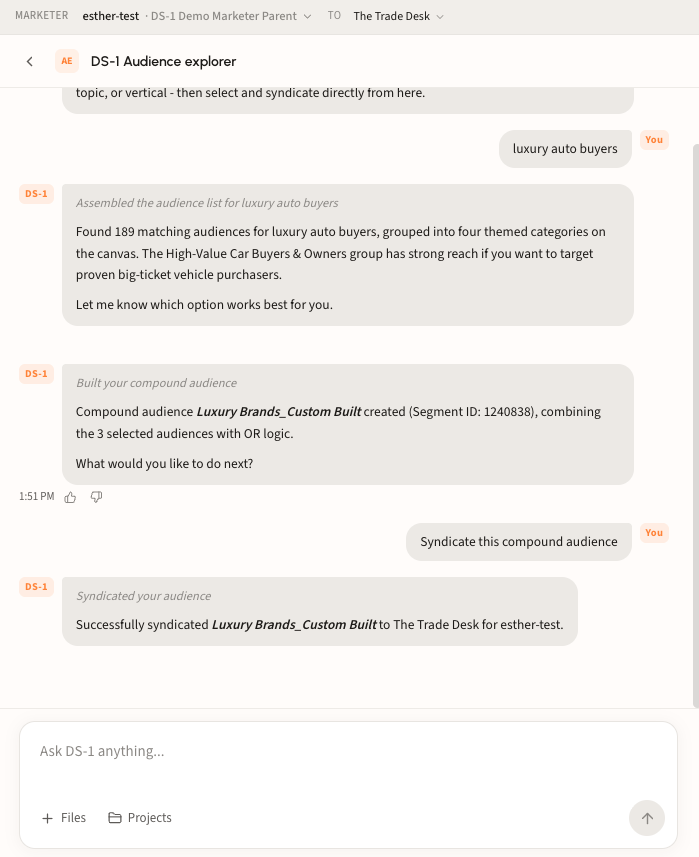
Type a specific objective or a general topic straight into the DS-1 chat box: a category, behavior, vertical, or brand. No taxonomy syntax required. Here: **"find me audiences related to luxury auto buyers."**
{% hint style="info" %}
Attach a brief or RFP with **Files**, or pull from a saved **Project**, and DS-1 will search the catalog against it.
{% endhint %}
### Step 2. Or open the agent directly
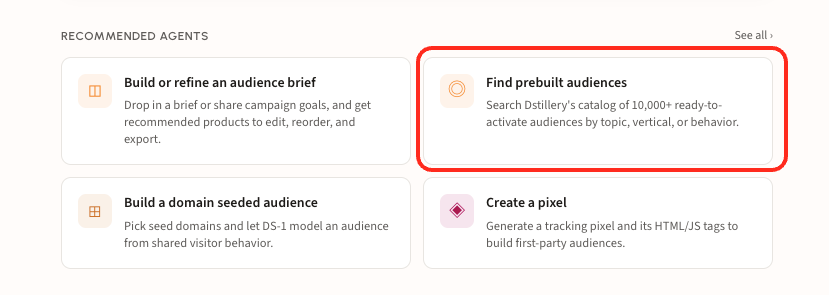
Rather start from the agent? On the DS-1 home screen, under **Recommended agents**, click **Find prebuilt audiences**, circled below. Either route lands you in the same Audience Explorer.
Use *Build or refine an audience brief* instead when you're still shaping the campaign, or *See all* to browse every agent.
### Step 3. Review the grouped results
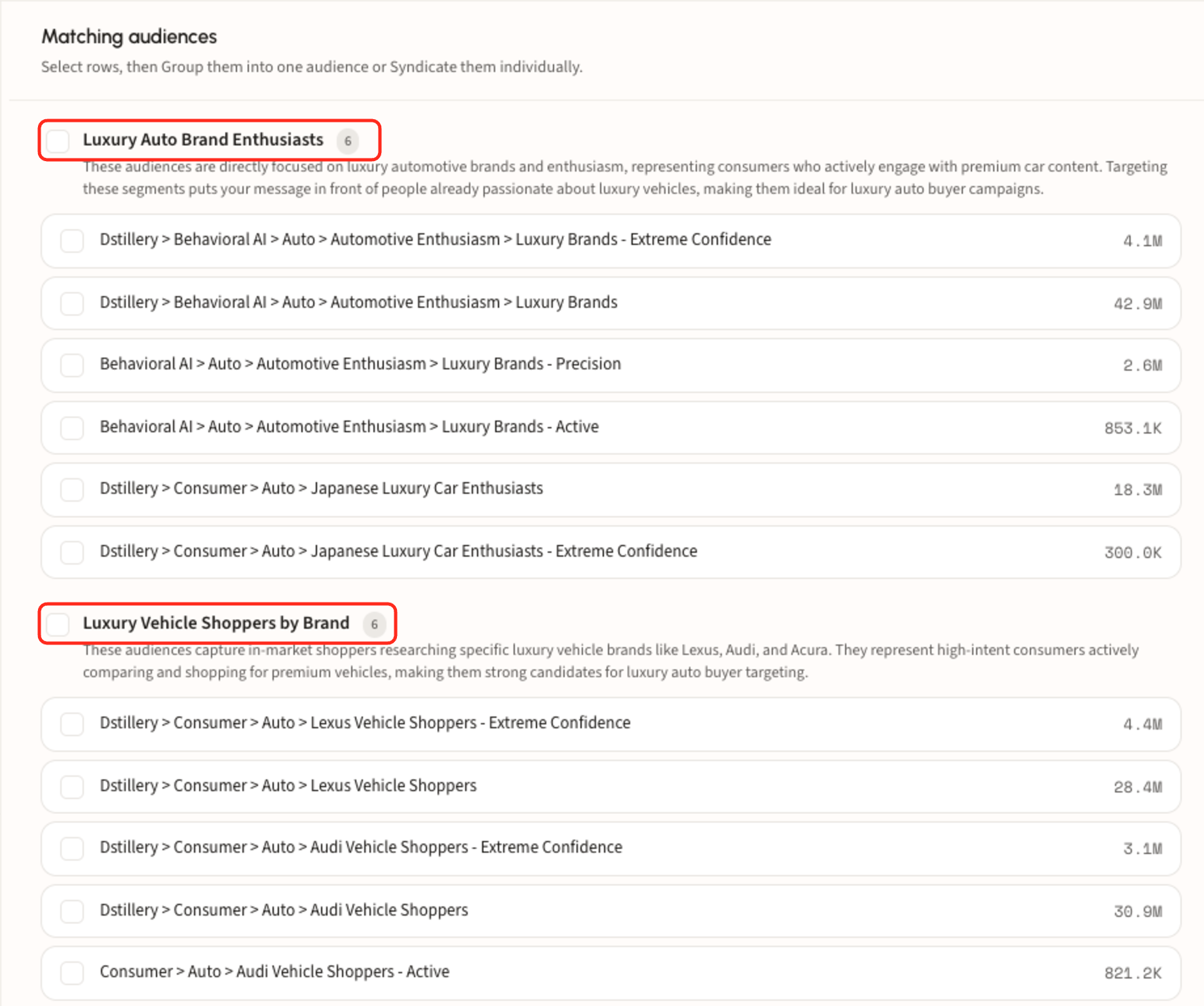
Matches land on the canvas at right, with chat and suggested next steps on the left. This run returned 189 audiences, which DS-1 sorted into four themed categories. The **bolded headers** circled below are those categories: DS-1 reads your search and clusters the catalog into the groupings that fit it best, so the most relevant angles surface first instead of one flat list.
* Read the group header and its rationale before the rows; it explains why those audiences were pulled together and what angle the category covers.
* The count badge next to each header is how many audiences sit in that category.
* Reach figures on the right are based on The Trade Desk's reported sizes and are estimates, so treat them as directional rather than exact deliverable scale.
* Confidence tiers trade scale for accuracy: **Extreme Confidence** is tightest, then **Precision** and **Active**.
* Not right yet? Use the suggestion chips to find similar audiences, swap a category, or hand off to the brief agent.
### Step 4. Select rows, then group them
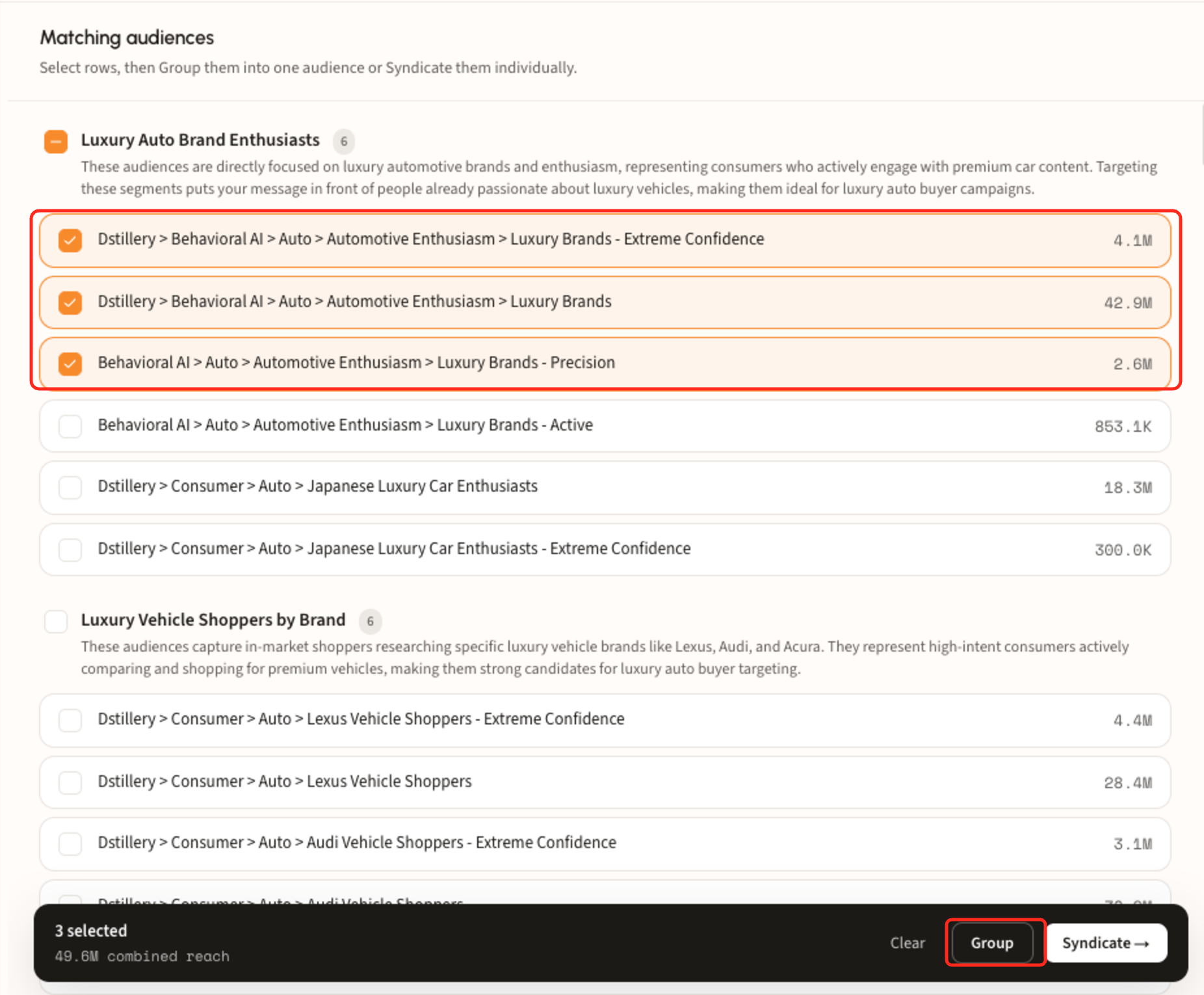
Tick individual audiences, or a whole group header, and a bar appears at the bottom with deduplicated combined reach. **Group** merges the selection into one compound audience with OR logic; **Syndicate** sends each one out individually.
Grouping returns a named audience and a Segment ID in chat: here, *Luxury Brands\_Custom Built*, Segment ID 1240838, at 49.6M combined reach.
### Step 5. Syndicate to your DSP seat
Confirm the marketer, advertiser account, and destination platform in the top bar, then syndicate. DS-1 confirms the handoff in chat and the audience is ready to target in the DSP. The session stays open, so keep searching, build another group, or start over.
{% hint style="warning" %}
If nothing in the catalog fits the campaign, hand the request to the **audience brief** or **domain seeded audience** agent to have DS-1 model something custom instead.
{% endhint %}