> For the complete documentation index, see [llms.txt](https://docs.dstillery.com/llms.txt). Markdown versions of documentation pages are available by appending `.md` to page URLs; this page is available as [Markdown](https://docs.dstillery.com/using-ds-1/agents/liveramp-data-marketplace.md).
# LiveRamp data marketplace
Search LiveRamp's marketplace of third-party segments across many providers, then pick and distribute.
## What the agent does
Search LiveRamp's data marketplace from inside DS-1. Describe what you are after and the agent surfaces matching third-party segments across the marketplace's many providers, so you can compare options and syndicate the ones you want without leaving the platform.
## Marketplace or partner audiences
Both search third-party data, but they are built and priced differently.
| | LiveRamp marketplace | [Dstillery partner audiences](/using-ds-1/agents/partnership-audience-search.md) |
| -------------------------- | ----------------------------------------------------------------------------------------------------------------- | -------------------------------------------------------------------------------------------------------------------------------------------------------- |
| **How segments are built** | Single signals, static demographic lists, or declared survey data; matched on basic overlap or single-site visits | Sector-specific partner data layered into the multimodal AI engine and synthesized with browsing, search intent, and CTV viewership across 400M+ devices |
| **Refresh** | Built once, refreshed weekly or monthly at best | Rescored every 24 hours across 400M+ devices |
| **Activation** | Traditional syndication pipelines, which can add processing delay | User segments, curated PMP deals across 7 SSPs, custom bidding, predictive contextual, and social via LiveRamp |
| **Pricing** | Varies by data provider | 30% of media, capped at $2.50, or a $1.40 CPM |
Use the marketplace for breadth: provider variety, niche categories, and segments you already buy elsewhere. Use partner audiences when modeled, current intent matters more than catalog size.
## Walk through a search
### Step 1. Describe what you are after
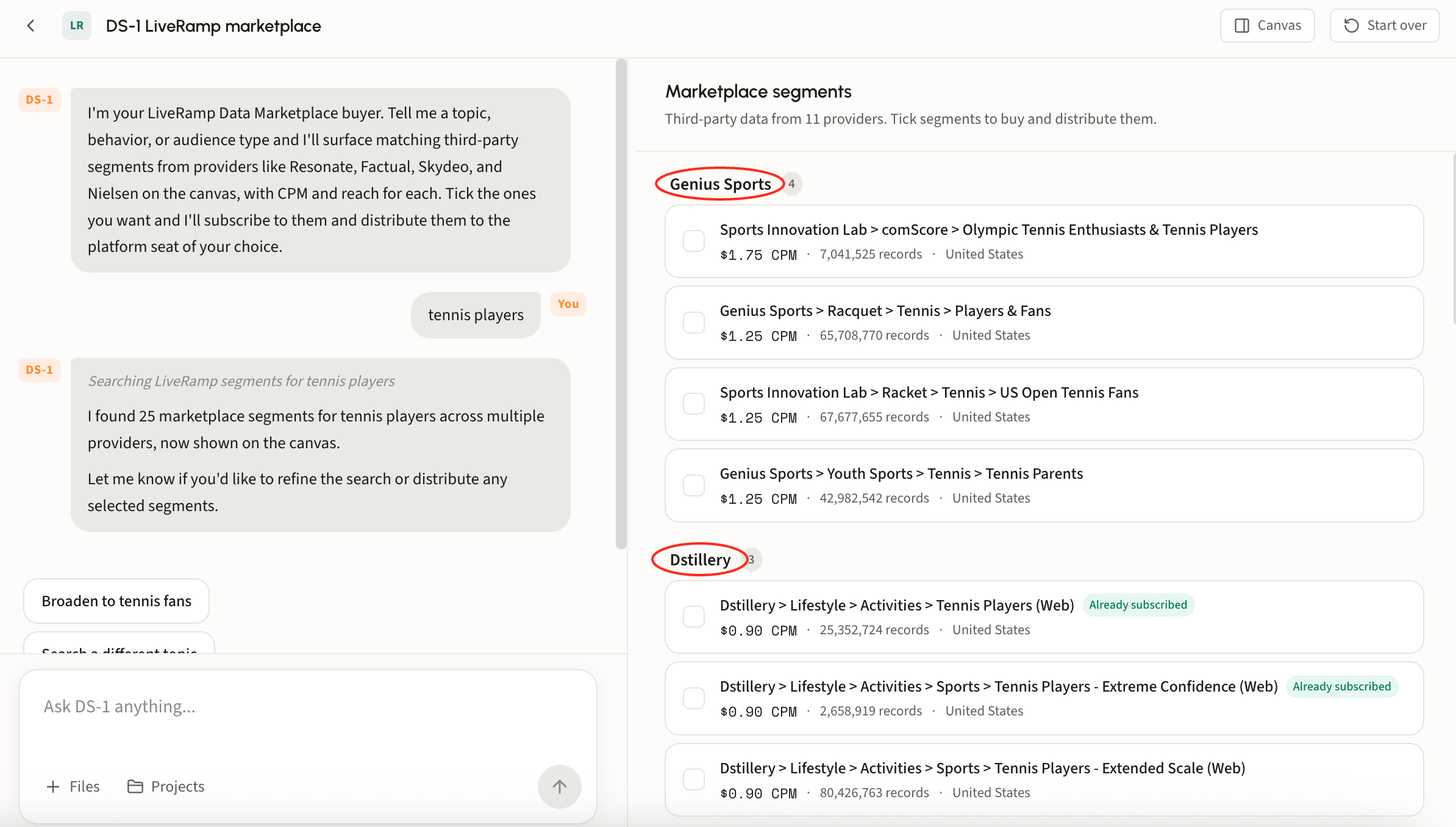
Give the agent a topic, behavior, or audience type in plain language, for example *tennis players*.
### Step 2. Review the segments
Matching segments land on the canvas under **Marketplace segments**, grouped by provider with a count beside each name. DS-1 reports the total it found in chat.
Every row carries the detail you need to compare like for like:
* **Full taxonomy path**, so you can see exactly where a segment sits in the provider's hierarchy.
* **CPM**, for cost comparison across providers.
* **Records**, the segment's size.
* **Country**, which matters when a provider lists the same segment per market.
* **Already subscribed**, flagged on segments you can use without buying again.
Scroll the canvas to compare across every provider in the result set.
Not quite right? Use the suggestion chips to broaden the search or start on a different topic, or chat with DS-1 to tailor the results.
### Step 3. Select and distribute
Tick the segments that fit the campaign. The bar at the bottom tracks the count and names the destination it will send to, with **Clear** to reset and **Distribute** to send.
DS-1 subscribes to the segments and distributes them to the platform seat you chose. See [Build and activate to a DSP or SSP](/using-ds-1/readme-2/activation/programmatic-dsps-ssps.md) for destinations and timing.