> For the complete documentation index, see [llms.txt](https://docs.dstillery.com/llms.txt). Markdown versions of documentation pages are available by appending `.md` to page URLs; this page is available as [Markdown](https://docs.dstillery.com/using-ds-1/agents/partnership-audience-search.md).
# Partnership Audience Search
Search partner data from NIQ, Emporia, ScreenEngine, and Resonate, then syndicate what fits.
## What the agent does
Tell DS-1 a topic, brand, or vertical and it surfaces matching partner-data audiences on the canvas. Tick the segments you want and syndicate them to your selected marketer, the same way you would any other audience.
It searches four partner catalogs:
* **NIQ**
* **Emporia**
* **ScreenEngine**
* **Resonate**
These are ready-to-activate partner segments. Search, select, syndicate.
## Why they perform
Partner audiences are not resold third-party lists. Dstillery takes sector-specific partner data spanning CPG, healthcare, B2B, and retail and layers it into its multimodal AI engine, synthesizing it with real-time browsing, search intent, and CTV viewership across 400M+ devices to form one predictive model of intent.
* **Rescored every 24 hours.** Every audience updates daily across 400M+ devices, so you are targeting behavior from yesterday rather than a profile built last quarter.
* **Activate any way you buy.** User segments, curated PMP deals across 7 SSPs, custom bidding algorithms, predictive contextual, or social platforms such as Meta via LiveRamp. Key activations are moving to direct S3 integrations, cutting middleman syndication wait times.
* **One pricing tier.** 30% of media, capped at $2.50, or a $1.40 CPM, rather than per-provider pricing that varies segment to segment.
Comparing against the open marketplace? See [LiveRamp data marketplace search](/using-ds-1/agents/liveramp-data-marketplace.md).
## Walk through a search
### Step 1. Describe what you are after
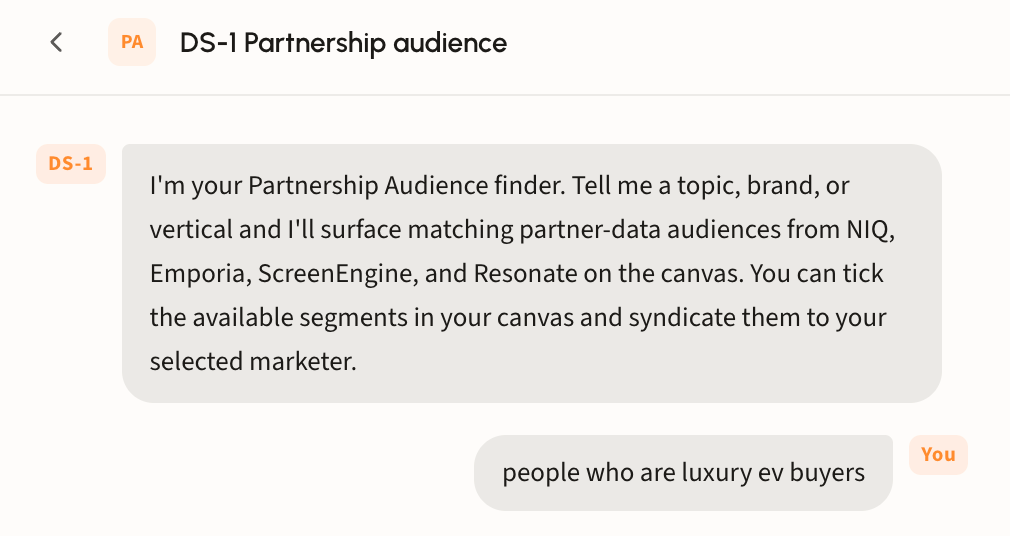
Give the agent a topic, brand, or vertical in plain language, for example *people who are luxury EV buyers*. No taxonomy syntax required.
### Step 2. Review the matches
Matching segments land on the canvas grouped by partner dataset, with a count beside each group name. A line at the top explains why these segments matched your query.
Every row shows its full taxonomy path, so you can see exactly where a segment sits in the partner's hierarchy before selecting it.
Not quite right? Use the suggestion chips to refine the search or chat with DS-1 to tailor your results.
{% hint style="info" %}
Do not forget to select your marketer and destination at the top before you syndicate.
{% endhint %}
### Step 3. Select and syndicate
Tick the segments that fit the campaign. The bar at the bottom tracks the count, with **Clear** to reset and **Syndicate** to send them to your selected marketer.
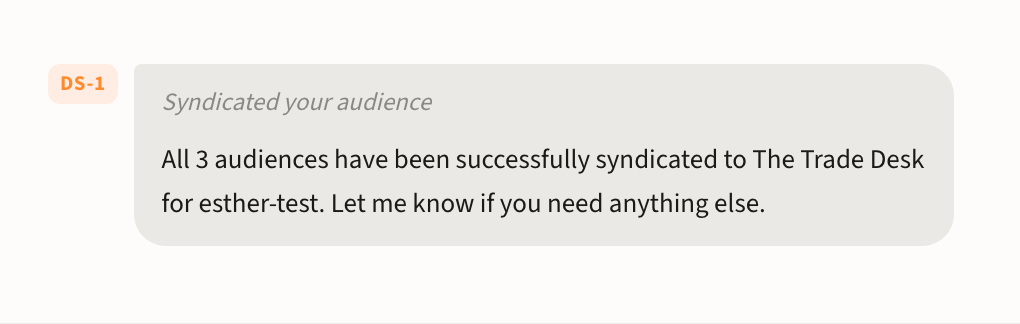
DS-1 confirms the handoff in chat, naming how many audiences went out and to which platform.
See [Build and activate to a DSP or SSP](/using-ds-1/readme-2/activation/programmatic-dsps-ssps.md) for destinations and timing.
{% hint style="info" %}
Looking for Dstillery's own catalog instead? See [Find prebuilt audiences](/using-ds-1/agents/find-prebuilt-audiences.md).
{% endhint %}

 {% endhint %}
### Step 3. Select and syndicate
Tick the segments that fit the campaign. The bar at the bottom tracks the count, with **Clear** to reset and **Syndicate** to send them to your selected marketer.
DS-1 confirms the handoff in chat, naming how many audiences went out and to which platform.
{% endhint %}
### Step 3. Select and syndicate
Tick the segments that fit the campaign. The bar at the bottom tracks the count, with **Clear** to reset and **Syndicate** to send them to your selected marketer.
DS-1 confirms the handoff in chat, naming how many audiences went out and to which platform.